Wi-Fi & 802.11
Wi-Fi is a shared radio channel doing an impression of an Ethernet cable. This page is about how it keeps the act up: the standards, the join, bands and channels, and what your signal meter really knows.
Layers on this page
This page covers OSI layer 2, data link, and layer 1, physical.
Ethernet frames, carried over air.
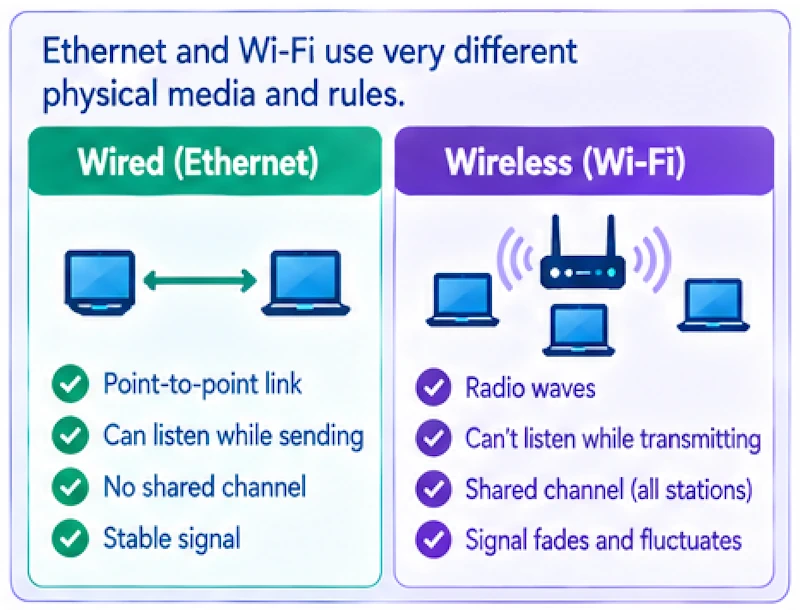
Your socket sees Ethernet. Frames, MAC addresses, IP packets riding inside. Down at the medium nothing matches that picture. A radio goes deaf the instant it transmits, every station fights for the same channel, and your signal sags when somebody walks between you and the AP.
So 802.11 dodges collisions instead of catching them (CSMA/CA). Wait for the channel to go quiet, roll a random backoff, send, then listen for an acknowledgement on each unicast frame. Missing ACKs get retried at layer 2, aggregated, retried again, all of it finished before TCP smells anything wrong.
Bad Wi-Fi almost never reaches your app as packet loss. It arrives as jitter. Pull the retry rate out of a capture and you'll see exactly where your milliseconds went.
From 11 Mbit/s to Wi-Fi 7.
Every generation added a trick: more bandwidth, more antennas or smarter sharing of the channel. Rates are theoretical maximums across all spatial streams. Real TCP throughput is usually less than half.
| Name | Standard | Year | Bands | Max width | Max PHY rate | Headline feature |
|---|---|---|---|---|---|---|
| — | 802.11b | 1999 | 2.4 GHz | 22 MHz | 11 Mbit/s | DSSS / CCK, the first mass-market Wi-Fi |
| — | 802.11a | 1999 | 5 GHz | 20 MHz | 54 Mbit/s | OFDM arrives |
| — | 802.11g | 2003 | 2.4 GHz | 20 MHz | 54 Mbit/s | OFDM at 2.4 GHz |
| Wi-Fi 4 | 802.11n | 2009 | 2.4 / 5 GHz | 40 MHz | 600 Mbit/s | MIMO, up to 4 spatial streams |
| Wi-Fi 5 | 802.11ac | 2013 | 5 GHz | 160 MHz | 6.9 Gbit/s | 256-QAM, downlink MU-MIMO |
| Wi-Fi 6 | 802.11ax | 2019 | 2.4 / 5 GHz | 160 MHz | 9.6 Gbit/s | OFDMA, 1024-QAM, target wake time |
| Wi-Fi 6E | 802.11ax | 2021 | 2.4 / 5 / 6 GHz | 160 MHz | 9.6 Gbit/s | Access to the 6 GHz band |
| Wi-Fi 7 | 802.11be | 2024 | 2.4 / 5 / 6 GHz | 320 MHz | ~46 Gbit/s | Multi-link operation, 4096-QAM |
Everything that happens before your first SYN.
Open the lid, call connect(), and dozens of frames have already flown. Open Wireshark in monitor mode and you'll see each of these steps.
-
Discover
The client sits and collects beacons, which an AP fires about ten times a second (100 TU, so every 102.4 ms), or it gets impatient and shouts with probe requests.
Beacon · Probe Req/Resp -
Authenticate
Under WPA2-Personal this step is pure ceremony, politely called "open system." WPA3-Personal does real work here with its SAE password exchange.
Authentication -
Associate
The client asks in. Both sides settle on rates, channel width and spatial streams, and the AP hands back an association ID.
Association Req/Resp -
4-way handshake
Four EAPOL frames prove each end knows the key, then derive fresh session keys. Data waits until that's done.
EAPOL 1/4 → 4/4 -
Get an address
DHCP Discover, Offer, Request, Ack. Then ARP goes hunting for the gateway's MAC.
DHCP DORA · ARP -
Your SYN
Now connect() can finally send its SYN. On a crowded network, steps 1 to 5 burn more time than the TCP handshake they're holding up.
TCP SYN →
Three bands, three personalities.
Lower frequencies go further and get through walls more easily. Higher frequencies have more room for wide, clean channels. Picking a band is a trade-off between range and capacity.
Range, crowds
The best range and wall penetration, but also the most crowded band.
- Channels 1–11 (US), 1–13 elsewhere
- Non-overlapping 1, 6, 11
- Width stick to 20 MHz
- Neighbours Bluetooth, microwave ovens
The workhorse
Many more channels and far less interference. Most enterprise Wi-Fi uses this band.
- Channels 36–165, varies by country
- Widths 20 / 40 / 80 / 160 MHz
- DFS radar can force a channel change
- Range shorter through walls
Clean and wide
No legacy devices are allowed here, only Wi-Fi 6E and Wi-Fi 7.
- Spectrum up to 1,200 MHz (US)
- Channels 59 × 20 MHz or 7 × 160 MHz
- Security WPA3 required
- Range shortest; best within a room
What does your signal number mean?
Hold Option and click the Wi-Fi icon on a Mac, or run iw dev wlan0 link on Linux, and you'll see a value in dBm. Drag the slider to find out what yours means in practice.
RSSI decoder
// rule-of-thumb thresholdsGood
The classic design target for voice and video. Below this, calls start to stutter when you move.
// RSSI is only half the story. You also want at least 25 dB of SNR above the noise floor.
Four generations of locks.
WEP
RC4 with stunted initialization vectors. Crackable inside a coffee break using free tools. Never.
WPA · TKIP
A patch that kept WEP-era chipsets breathing. Today's gear punishes TKIP by dragging the whole link down to legacy rates.
WPA2 · AES
Strong crypto, sloppy habits. Capture one handshake and a lazy passphrase falls over on a GPU, offline, with nobody watching.
WPA3 · SAE
SAE strangles offline dictionary attacks and brings forward secrecy along with it. Mandatory on 6 GHz, which is the nicest thing about 6 GHz.
Roaming is the client's call
No AP hands you off. Your laptop decides when to let go, and plenty of clients cling to a dying signal out of stubbornness: the hysteresis baked into their drivers keeps them latched to the old AP until the link is nearly unusable. 802.11k feeds them neighbour reports, 802.11v nudges them, 802.11r makes the jump cheap. If your SSH session freezes halfway down a hallway, start here.