Tuning Linux TCP Parameters for High-Latency or Noisy Wi-Fi Links
If you've ever stared at an iperf3 output wondering why your throughput craters the moment someone microwaves popcorn two rooms away, this piece is for you. I wrote it for people who build socketed applications, run Linux boxes at the network edge, or simply refuse to accept "Wi-Fi is just slow" as an answer. You'll need root, a working knowledge of sysctl, and the patience to run a test more than once. That's the whole entry ticket.
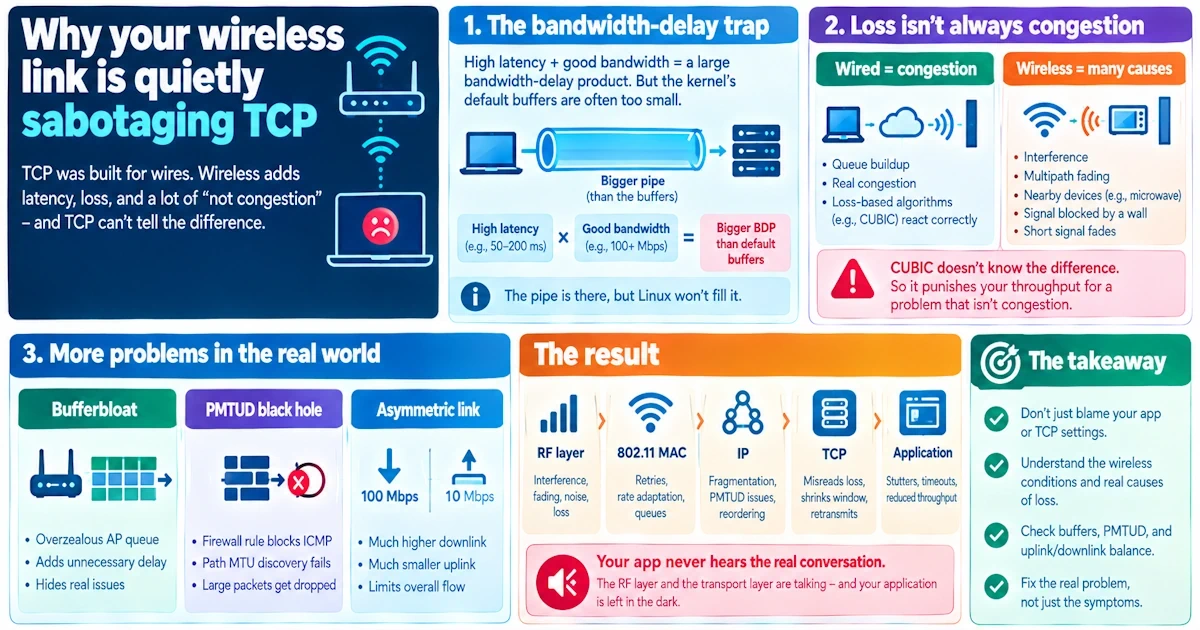
Why your wireless link is quietly sabotaging TCP
Here's the ugly truth nobody tells you at the start: TCP was born on wires, and wireless treats it like an unwelcome houseguest. High latency combined with decent bandwidth creates a bandwidth-delay product that's often bigger than the default buffers Linux ships with. The pipe is there, but the kernel won't let TCP fill it.
Then there's the matter of loss. Wired networks mostly drop packets because of congestion, so loss-based algorithms like CUBIC treat every dropped segment as a traffic jam and slam the brakes. Wi-Fi drops packets because of interference, multipath fading, a neighbor's microwave, or a signal that dipped for half a second behind a concrete wall. None of that is congestion. CUBIC doesn't know the difference, so it punishes your throughput for a crime the network didn't commit.
Add bufferbloat from an overzealous access point queue, a PMTUD black hole courtesy of some router's firewall rule, and an asymmetric uplink that's a fraction of the downlink, and you've got a flow that stutters even when the signal bars look fine. The RF layer and the transport layer are having a conversation your application never gets to hear.
Measure first, tune second
Changing sysctl values before you know what's actually broken is like replacing your carburetor because the car made a funny noise once. Gather evidence first.
Run ping over several minutes and watch the jitter, not just the average RTT. A link that bounces between 20ms and 400ms is a different animal than one sitting steady at 150ms. Pair that with traceroute to confirm the path isn't doing something strange, and use iperf3 to get real throughput and retransmit counts rather than guessing from a browser download bar.
For a closer look, ss -ti will show you the congestion window, retransmission counts, and RTT estimates per socket, right there in your terminal. If you want to break things safely, tc netem lets you inject artificial latency and loss on a test interface so you can reproduce a bad commute without actually dragging your laptop to the far end of the garden.
And don't skip tcpdump or Wireshark. Watching duplicate ACKs pile up tells you if you're facing real loss, reordering, or a spurious retransmit triggered by a jittery RTT estimate. Record a baseline under idle conditions, typical use, and your worst-case scenario before you touch a single parameter. Otherwise you're tuning blind, and you won't know if your "fix" actually fixed anything.
The parameters that matter most
Buffer ceilings first. net.core.rmem_max, net.core.wmem_max, and their ipv4 cousins tcp_rmem and tcp_wmem cap how large a TCP window can grow. On a link with a big bandwidth-delay product, the stock defaults (often a few megabytes) choke your throughput before the wireless layer even gets a chance. Bump the max field of tcp_rmem and tcp_wmem into the tens of megabytes, raise rmem_max and wmem_max to match, and retest after every nudge. Resist the urge to triple everything in one go.
Window scaling and timestamps come next, and this pairing is close to mandatory. net.ipv4.tcp_window_scaling needs to stay enabled, because without it your window is capped at 64KB regardless of what you set above. Timestamps (net.ipv4.tcp_timestamps) help the stack measure RTT accurately on a link where RTT swings wildly, so leave them on unless you have a specific reason to strip the overhead.
Selective acknowledgement, governed by net.ipv4.tcp_sack, should always be on for noisy links. It lets the receiver tell the sender exactly which segments survived, instead of forcing a blunt retransmission of everything past the first gap. Pair it with net.ipv4.tcp_no_metrics_save=1 if your Wi-Fi quality swings from excellent to abysmal across sessions. Cached RTT and congestion window history from a good session will otherwise poison a new connection made during a bad one.
MTU probing deserves a mention because PMTUD failures are sneakier than people expect. Behind a flaky AP or an overzealous NAT, ICMP "fragmentation needed" messages sometimes vanish into the ether, leaving a connection to stall indefinitely on packets just slightly too big. Setting net.ipv4.tcp_mtu_probing to 1 (or 2 for a more aggressive stance) gives the stack a way to discover a working size without waiting on messages that will never arrive.
Lastly, look at retransmission timeout behavior. net.ipv4.tcp_frto enabled (try 2) helps the stack recognize a spurious retransmission timeout instead of assuming congestion and collapsing the window unnecessarily. Leave net.ipv4.tcp_retries2 alone unless you have a concrete reason to lower it; cutting it too aggressively will kill long-lived flows exactly when the link needs patience, not panic.
Choosing a congestion control algorithm with your eyes open
CUBIC ships by default and handles large bandwidth-delay products reasonably well, but it's loss-based at heart, and loss-based algorithms get twitchy on wireless. BBR takes a different approach entirely, modeling the bottleneck rather than reacting purely to drops, and it often performs beautifully on high-latency links with modest loss. On a crowded, contested channel, though, BBR can be a bit of a bully toward competing flows, so don't assume it's a free lunch.
There's also a smaller, less famous family worth trying: Westwood+, Hybla, and other wireless-aware variants built specifically to distinguish non-congestion loss from the real thing. They won't show up in every benchmark article you read, but on a genuinely noisy link they sometimes outperform the popular choices by a wide margin.
The only sane way to choose is to run CUBIC, BBR, and at least one wireless-aware option side by side under the same netem-simulated conditions, then compare retransmits, throughput, and fairness. Don't swap congestion control on a production box because a blog post told you to. Test it on your link, with your latency profile, under your noise pattern.
Queueing matters as much as any sysctl
Bufferbloat is the silent killer here, and no amount of TCP tuning fixes a queue that's three seconds deep. Switch the Wi-Fi interface's queueing discipline to fq_codel or cake, and set net.core.default_qdisc accordingly so new interfaces inherit the behavior. Both disciplines actively manage queue depth and improve fairness between competing flows, which matters enormously on a home AP juggling a video call and a backup job simultaneously.
Interface txqueuelen and net.core.netdev_max_backlog are worth a look too, but resist the instinct to crank them upward just because bigger sounds safer. A deeper queue smooths out bursts but adds latency, which is precisely the problem you're trying to solve. On embedded access points, IRQ affinity and offload settings can also shift performance, though they're a good way to introduce a regression if you don't test carefully afterward.
A sane order of operations
Measure your baseline before anything else, the way any good engineer would before reaching for a wrench. Raise the buffer ceilings gradually, retesting after each bump rather than batching five changes together and hoping for the best. Turn on SACK, window scaling, timestamps, and MTU probing early since they carry little downside and frequently solve real problems outright. Experiment with congestion control under controlled conditions rather than swapping it blind. And apply fq_codel or cake at the access point level before you reach for exotic kernel hacks, because queueing discipline often solves more than any single sysctl value ever will.
Where people trip themselves up
A router juggling dozens of simultaneous flows doesn't benefit from every connection hoarding tens of megabytes of buffer; memory runs out and fairness goes out the window with it. Tuning aggressively for one troublesome link can quietly wreck performance on another, so apply changes per-host or per-class where your setup allows it rather than globally. And remember that proprietary Wi-Fi firmware and non-Linux access points have opinions of their own. Your kernel-side tuning can be flawless and still get undermined by a driver doing something undocumented three layers down. Always verify end to end, not just on the box you tuned.
Snippets you can actually paste in
For a quick, reversible test:
sudo sysctl -w net.ipv4.tcp_mtu_probing=1
sudo sysctl -w net.core.rmem_max=26214400
sudo sysctl -w net.ipv4.tcp_rmem="4096 87380 26214400"
To make it stick across reboots, append the same key-value pairs to /etc/sysctl.conf (or a file under /etc/sysctl.d/) and run sudo sysctl -p. Keep a copy of the original values somewhere boring and obvious, because the day you need to revert is never the day you remember what you changed.
Closing thoughts and your checklist
You absolutely can make TCP behave on a flaky Wi-Fi link, but the win comes from discipline, not incantation. Measure first. Change one thing. Measure again. Favor smarter queueing and the right congestion control over blindly inflating numbers you don't fully understand.
Quick checklist: establish a baseline, enable SACK and window scaling, raise buffers incrementally, trial BBR or Westwood+ against CUBIC, deploy fq_codel or cake on the access point, turn on MTU probing, enable F-RTO if spurious retransmits are a pattern, avoid blanket over-allocation on shared routers, write down every change you make, and retest under real conditions before calling it done.