When TCP Retransmits Aren't Your Code's Fault: RF Causes and Remedies
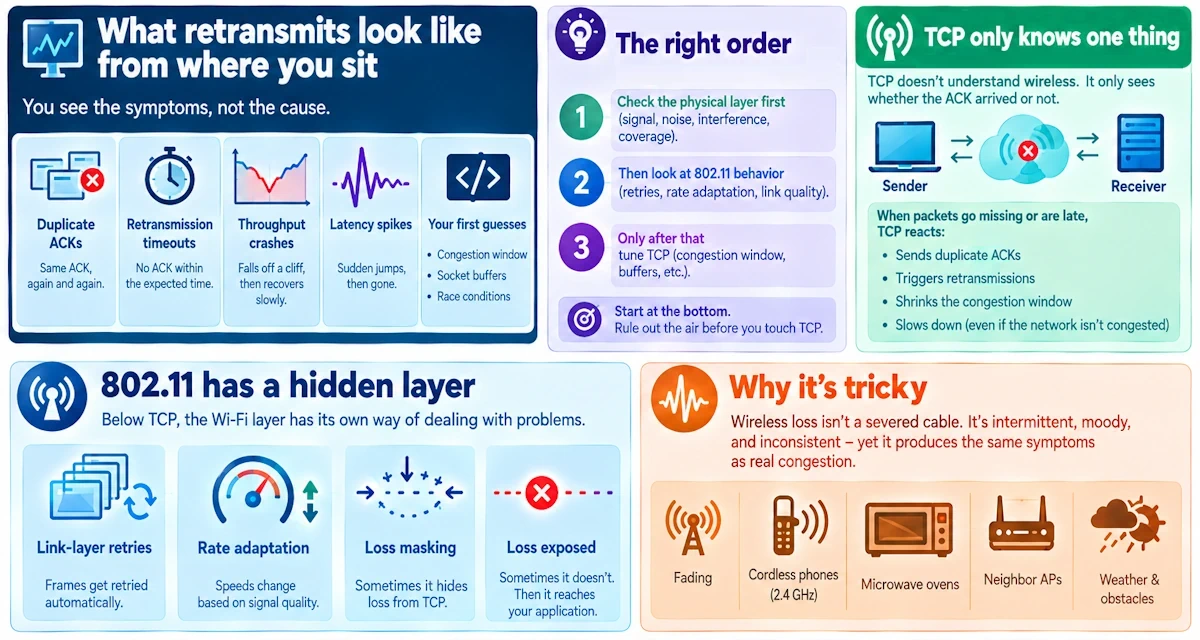
Your socket code might be flawless. Clean handshakes, proper buffer sizing, sane timeout logic. And still the throughput graph looks like a seismograph during an earthquake. Here's the thing nobody tells junior developers in networking bootcamp: the air between two devices is a liar, a cheat, and occasionally a saboteur.
What this piece covers
I'm going to walk through the practical chain: from what you see at the socket, down through 802.11 frame behavior, into the radio environment itself. No Maxwell's equations, no Fourier transforms scrawled on a chalkboard. Just the checks you'd actually run on a Tuesday afternoon when your app is stuttering and your manager wants answers.
What retransmits look like from where you sit
Duplicate ACKs. Retransmission timeouts. Throughput that falls off a cliff and crawls back. Latency spikes that seem to come from nowhere, then vanish just as fast. Every developer's first instinct is to suspect their own congestion window logic, their socket buffer sizes, maybe a race condition in the send loop.
I get it. Code feels controllable. The radio doesn't. But here's my blunt advice, delivered the way I used to deliver it to students who wanted to rewrite their whole app before checking a cable: verify the physical layer first. Don't touch TCP tuning knobs until you've ruled out the air itself.
A fast primer on how wireless actually breaks TCP
TCP only knows one language: did the ACK arrive, or didn't it? It has no concept of fading, no concept of a cordless phone blasting 2.4GHz noise across your office. When packets go missing or arrive late, TCP's congestion machinery kicks in and starts retransmitting, shrinking windows, generally behaving like it just got mugged.
But 802.11 has its own retry mechanism sitting underneath TCP, invisible to your socket API. Link-layer frames get retried automatically, rate adaptation algorithms shift speeds up and down, and sometimes this hides loss from TCP entirely. Sometimes it doesn't, and the loss bubbles straight up to your application. The key realization here, one I wish more engineers internalized: frame loss isn't a severed cable. It's intermittent, moody, and maddeningly inconsistent, yet it produces symptoms identical to genuine congestion.
The usual radio-frequency suspects
Co-channel and adjacent-channel interference tops my list every single time. Your AP and the neighbor's AP are both shouting on channel 6, or close enough that their transmissions collide in the airtime. Everyone waits, everyone retries, and your TCP stream pays the toll.
Multipath fading deserves its own paragraph because it's genuinely weird if you haven't encountered it. Radio waves bounce off walls, furniture, the filing cabinet nobody's moved since 2014. These reflections arrive at the receiver slightly out of phase, sometimes cancelling each other out entirely. Stand six inches to the left and the signal's fine. Stay put and you're in a dead zone the size of a dinner plate. This is why "it works when I hold my laptop this way" isn't a joke - it's physics being inconvenient!
Hidden node problems happen when two clients can both hear the access point but can't hear each other. They transmit simultaneously, thinking the air is clear, and their frames collide right at the receiver where it matters most. Add in physical obstructions (concrete, water pipes, a conference room packed with bodies, since humans are mostly water and water absorbs 2.4GHz rather well) and your SNR swings around with every door that opens and closes.
Then there's hardware that's simply not pulling its weight. Cheap antennas, a loose connector, a radio chip with firmware nobody's patched since launch day. Add too many clients fighting for the same airtime, throw in a neighbor's microwave oven or a janky Bluetooth mouse, and you've got a stew of noise sources that no amount of clever socket code will fix.
Rate adaptation algorithms can misbehave too, oscillating wildly between high and low data rates and leaving a trail of lost frames in their wake. And don't forget power-saving modes: a client that's dozing to save battery life creates brief windows where it simply isn't listening, and roaming between access points can cause a nasty little gap in connectivity right when you least expect it.
Spotting the radio as the culprit
Grab packet captures on both ends if you can manage it. Wireshark with radiotap headers will show you 802.11 retry flags that never surface in a standard TCP dump. Line those retries up against your TCP retransmits and RTT spikes, and patterns emerge fast.
Watch RSSI and SNR trends over time. A steady signal that occasionally nosedives tells a very different story than one that's permanently weak. Pull up a spectrum analyzer, even a cheap one, and look at the waterfall display for pulsing or continuous interference sitting right on your channel. Check driver and firmware counters too, since rate changes and reassociation events often explain gaps that look mysterious from the TCP side alone. If you can capture simultaneously at the access point and the client, do it. The physical-layer clues hide in that radiotap data like a secret the frame doesn't want you to notice.
Quick wins worth trying first
Change channels. A five-minute Wi-Fi scan often reveals a quieter slice of spectrum sitting right there unused. Reposition the AP or antenna, since a foot of movement sometimes accomplishes what hours of configuration tweaking cannot. Check for lopsided transmit power between AP and client too, because an imbalance there creates asymmetric coverage that confuses everyone involved.
Tuning the configuration
RTS/CTS helps specifically with hidden node scenarios, though it adds overhead so use it selectively. Fragmentation thresholds are a last resort, a trade of throughput for reliability you shouldn't make lightly. Set sensible minimum rates to stop oscillation in its tracks. Verify that 802.11n, ac, or ax features like guard intervals and spatial streams are actually configured correctly rather than assumed, and apply QoS so a single greedy client doesn't monopolize the airtime while everyone else starves.
Hardware and deployment fixes
Sometimes the honest answer is more access points, positioned to shorten the distance a client's radio has to shout across. Swap out bad antennas, check every connector, and consider directional antennas when you've got a specific interferer to work around.
Touching the software stack, carefully
Resist the urge to rewrite your congestion control algorithm as a first move. Update NIC drivers and firmware first, because a staggering number of "impossible" retransmit patterns turn out to be a driver bug nobody fixed. Only after confirming the RF environment is clean should you consider adjusting SACK behavior or minimum RTO values.
Proving it with before and after tests
Baseline everything: throughput, retransmit rate, RTT, SNR, retry counters. Change one variable, then retest. Run both iperf3 bulk transfers and something resembling your actual application traffic, and keep a capture for every run so you've got evidence, not just a hunch.
A checklist before you blame your code
Capture both 802.11 and TCP traffic. Check RSSI, SNR, and retry counters. Scan for non-Wi-Fi noise sources nearby. Try reproducing the issue over a wired connection to rule out application bugs entirely. Then change one RF variable at a time and measure again.
The conclusion, bluntly stated
Not every retransmit is a bug with your name on it. Radio is messy, mobile, temperamental, and it doesn't care how elegant your state machine is. Diagnose the air before you touch another line of socket code, and if you're stuck, find yourself an RF-savvy friend. Oliver certainly approves.
Tools worth keeping close
Wireshark with radiotap support, a decent spectrum analyzer or Wi-Spy device, iperf3 for bulk testing, hostapd logs, vendor driver logs, and a basic site survey app for good measure.