Why Your TCP Connection Dies on Wireless - Diagnosing Real-World Wi-Fi Drops
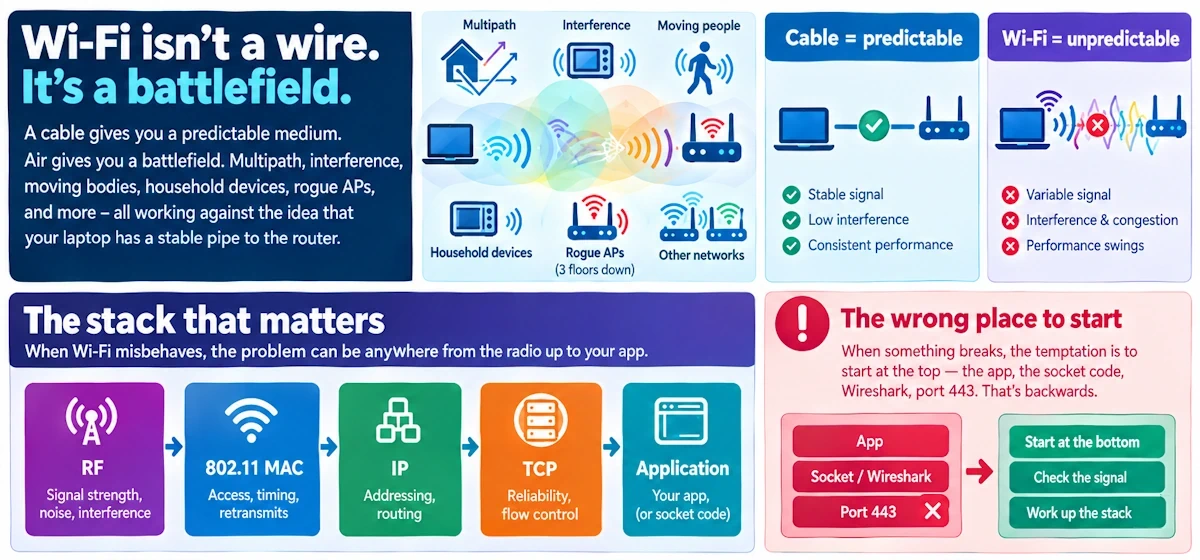
Cut through the noise. Frames, radios, drivers and sockets are all conspiring against you, and your TCP session is the casualty.
Wi-Fi was never meant to behave like a wire. I taught RF for longer than I'd like to admit, and the single lesson that took students the longest to absorb was this one: a cable gives you a predictable medium, while air gives you a battlefield. Multipath, interference, moving bodies, microwave ovens, rogue access points three floors down, all of it conspires against the fiction that your laptop has a stable pipe to the router.
The stack that matters here runs from RF up through the 802.11 MAC layer, into IP, through TCP, and finally lands at whatever application is screaming about a dropped connection. When something breaks, the temptation is to start at the top, in the app, in the socket code, in Wireshark filtering on port 443. Wrong direction. Start at the bottom. Start at the signal.
The four fingerprints of failure
You'll see the same patterns again and again once you've chased enough of these ghosts. Learn to recognize them on sight.
The sudden blackhole is the dramatic one. TCP stalls dead, retransmits pile up, and eventually the connection times out like it hit a wall. Usually this means an RF fade swallowed the link, a roam event happened mid-stream, or the access point itself rebooted without so much as a courtesy notice.
The slow death is sneakier. The link stays "up" in every status bar you check, yet throughput bleeds out minute by minute. Rate adaptation algorithms downshifting, interference chewing into airtime, contention from a dozen other clients on the same channel. Nothing crashes. It just gets worse until it's unusable.
Intermittent blips are the maddening middle ground: short bursts of loss that recover on their own before you can even get a capture running. Hidden node problems, botched RTS/CTS negotiation, co-channel contention from your neighbor's access point. These vanish the moment you start looking, which is its own kind of torment.
And then there's the one-way failure, where packets leave fine but responses never arrive, or vice versa. This one often isn't RF at all. It's a driver bug, a NAT table that expired, a bridge losing state, or client isolation quietly enabled on the AP without anyone remembering they turned it on.
Start here: the triage that actually works
Before you touch a spectrum analyzer, do the boring thing. Plug in. Tether to a phone. Try Ethernet-over-power if you've got the adapter lying around. If the problem vanishes the second you're off wireless, congratulations, you've already isolated half the universe of possible causes.
Check your RSSI and SNR. Check your negotiated link speed. Confirm your association status and your actual client IP, because a stale DHCP lease masquerading as a working connection is a classic trap. Then run a baseline: ping for the obvious, mtr for the hop-by-hop story, and iperf in both TCP and UDP modes to reproduce the failure on demand rather than waiting for it to happen to you again at the worst possible moment.
Where the radio actually fails you
Signal-to-noise ratio tells a story, but it's the fluctuation that matters more than the raw number. A steady low SNR is annoying but at least predictable. A wildly swinging SNR, caused by multipath fade, someone walking between you and the AP, or a loose antenna connector, will wreck TCP far worse than a consistently weak signal ever could.
Interference deserves its own paragraph because it's everywhere and nobody checks for it. Neighboring APs stacked on the same channel, Bluetooth devices chattering away, a microwave oven warming up lunch two rooms over, even LTE coexistence issues on certain chipsets. Channel utilization is the metric you want here, not just signal strength.
DFS channels add their own flavor of chaos. The moment radar is detected, your AP has to vacate that channel immediately, forcing every client into a disruptive re-association. If your drops correlate suspiciously with certain times of day near an airport, this is worth investigating.
Antenna and chain problems degrade MIMO performance in a way that's easy to miss. A broken spatial stream doesn't necessarily kill the connection. It just quietly halves your throughput and doubles your retransmits, and you'll spend hours blaming the software before you check the hardware.
Hidden node trouble and the capture effect round out the list: two clients that can't hear each other but can both hear the AP, colliding on transmission and forcing retransmits that stack up into head-of-line blocking.
Protocol behaviors that quietly sabotage TCP
Frame loss at the MAC layer triggers retransmits that TCP interprets as latency and jitter, even though the actual packet loss TCP sees might be zero. Frame aggregation makes this worse: pack a dozen MPDUs into one aggregate, and a single failed subframe can force a retransmission of the whole batch.
Rate adaptation algorithms are supposed to help, downshifting to a more robust modulation when conditions degrade. In practice, conservative implementations overcorrect, throttling throughput long after conditions have improved, or oscillating wildly between rates and producing bursts of loss that look for all the world like a TCP problem.
Then there's power-save mode, that quiet little feature nobody remembers exists until it ruins their day. A client legitimately sleeping between beacons can stall TCP if keepalives aren't frequent enough to keep the session breathing.
The host isn't innocent either
Driver and firmware bugs are depressingly common. Firmware resets under load, memory exhaustion in cheap chipsets, botched roaming logic that drops the association mid-handoff. I've lost entire afternoons to a driver that technically "worked" but fell over the moment real traffic hit it.
TCP's own retransmission timers can inflate badly on lossy links, and multiple consecutive RTOs produce stalls that feel eternal from the application's perspective. Socket settings matter too: an aggressive application timeout, an undersized SO_RCVBUF, absent keepalives, any of these will make a recoverable wireless hiccup look like a dead connection. And don't discount offloading features like TSO, GSO and LRO. They're great for performance, and they're also excellent at hiding packet loss until a buffer finally flushes and dumps the evidence all at once.
Infrastructure traps that masquerade as TCP bugs
An overloaded access point starves every client of airtime, producing queuing delays that have nothing to do with your radio and everything to do with how many other devices are competing for the same spectrum. Misconfigured QoS and WMM settings can let voice and video traffic monopolize airtime, or force everyone down to legacy rates for the sake of one ancient device. VLAN misconfigurations, DHCP renewal delays and captive portal authentication timeouts can all impersonate a dead TCP session when really it's an addressing problem wearing a disguise. And stale NAT or bridge state will drop return traffic silently, leaving you convinced the far end has vanished.
What to capture, and how to line it up
Get a channel utilization scanner or spectrum analyzer running to see what's actually occupying the air. Capture 802.11 frames with radiotap headers in Wireshark so you can see retransmit counts, negotiated rate, RSSI and sequence gaps directly. Run tcpdump on the host simultaneously to catch retransmits, SACKs, duplicate acks and RTT estimates. Pull AP or controller logs for re-association events, DHCP activity, firmware resets and DFS triggers. None of this means anything in isolation, though. Synchronize your clocks, or at minimum note relative offsets, so you can line up the radio-level event with the TCP-level symptom and see the causality rather than guessing at it.
The procedure, step by step
Reproduce the fault first, with the smallest set of steps that reliably triggers it. Isolate by moving the client, swapping the AP, or changing the NIC, separating radio problems from stack problems. Measure with simultaneous radio and host captures. Interpret by looking for the telltale pattern: retransmit storms, zero acks, repeated association churn. Then fix the specific thing you found, and verify against your original baseline rather than declaring victory on vibes.
Quick fixes worth trying first
Move to a quieter channel, and favor 5 GHz when the range allows it. Disable legacy rates where you can and make sure 802.11n/ac/ax features are actually configured correctly rather than just enabled by default. Update firmware and drivers before you go spelunking through packet captures, because an embarrassing number of these mysteries turn out to be a known bug fixed two versions ago. Tune TCP keepalive intervals, adjust RTOmin, or enable pacing for clients that live primarily on wireless links.
Fixes built to last
On the network side: airtime fairness, sensible QoS classes, proper AP density planning and power control so cells don't trample each other. On the host side: SO_KEEPALIVE, TCP_USER_TIMEOUT, sensible buffer sizing, SACK and pacing tuned for a lossy medium rather than a clean one. And ongoing monitoring, because a spectrum snapshot today tells you nothing about the new neighbor's microwave that shows up next month.
The parting shot
Verify wireless first, capture both layers, correlate the timestamps, isolate the variable, fix the actual cause, then verify again. That's the whole process, no shortcuts.
If you treat Wi-Fi like Ethernet, you'll be blind to the real killers. Measure the radio first.
Tools worth keeping close: Wireshark with radiotap support, tcpdump, iperf, mtr, and a decent spectrum analyzer or site survey tool like Ekahau. Next time around, I want to dig into TCP pacing and the strange, sometimes counterproductive habits of rate adaptation algorithms. There's a whole rabbit hole there worth the trip.