Practical Antenna Placement for Home Labs: Boosting TCP Throughput Without Breaking FCC Rules
Here's what nobody tells you when you buy a shiny new access point: the box doesn't care if you shove it behind a monitor, under a desk, or inside a metal cabinet. It'll still blink green. Meanwhile your TCP flows are choking on retransmits, your congestion window is collapsing every few seconds, and you're blaming the ISP. I've spent decades with a spectrum analyzer in one hand and a coffee in the other, and I can tell you this: move the antenna six inches and watch the goodput jump. No new hardware. No firmware hacks. Just physics, done right, and done legally.
Why Your Packets Care About Where You Put Metal and Plastic
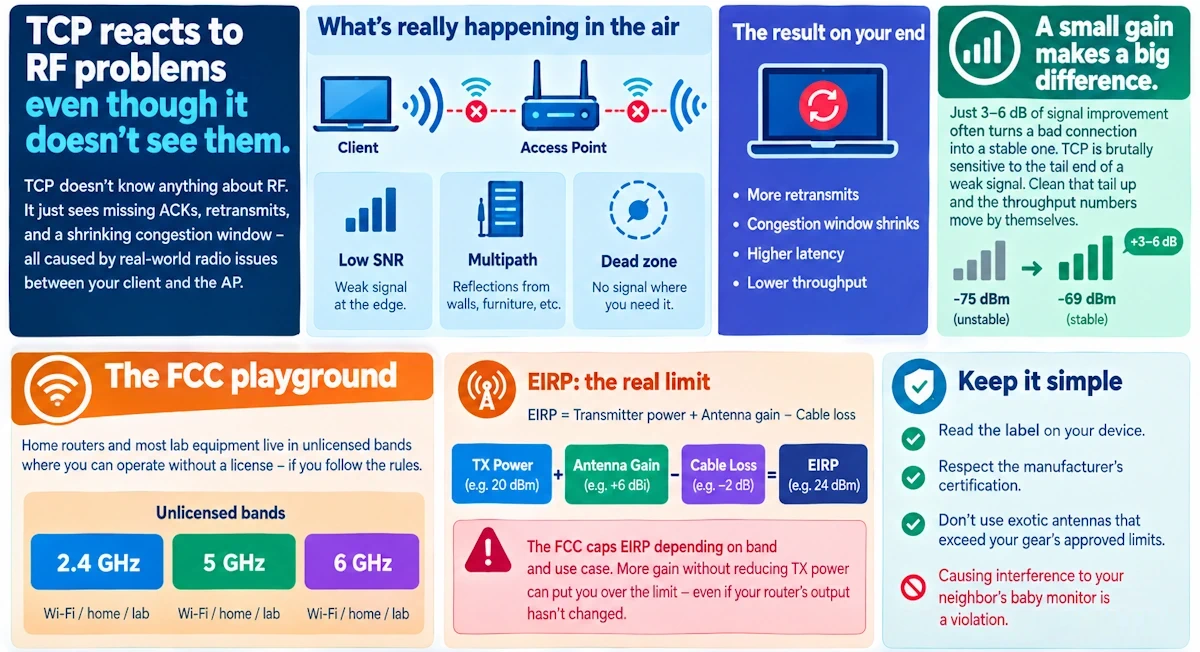
TCP doesn't know anything about RF. It doesn't need to. But every retransmit it fires off, every time its congestion window shrinks because an ACK didn't arrive, traces back to something physical happening in the air between your client and your AP. Low SNR. Multipath bouncing off your filing cabinet. A dead zone right where your test bench sits.
Fortunately, you don't need heroic gains to fix this. A 3 to 6 dB improvement, which sounds trivial on paper, often means the difference between a flow that retransmits constantly and one that cruises. TCP is brutally sensitive to the tail end of a weak signal. Clean that tail up and the throughput numbers move by themselves.
The FCC Lines You Don't Want to Cross
Before you start rearranging gear, know your playground. Home routers and most lab equipment live in the unlicensed bands, 2.4, 5, and increasingly 6 GHz, where you get to operate without a license as long as you stay inside the rules.
The catch is EIRP, effective radiated power. That's transmitter power plus antenna gain minus cable loss, and the FCC caps it depending on band and use case. Bolt on a high-gain antenna without dialing back your TX power and you can blow past the limit even though your router's output hasn't changed a single milliwatt.
Keep it simple: read the label on your device, respect what the manufacturer certified it for, and don't go hunting for exotic antennas that exceed what your gear was approved with. Causing interference to your neighbor's baby monitor is a violation!
The Checklist I Actually Use on Placement Day
Elevation first. Height solves more RF problems than any setting in your admin panel. An AP tucked under a desk is fighting your own furniture. Get it up high, central to the room, with as much unobstructed path to your devices as you can manage. Line-of-sight is still king, Wi-Fi hasn't repealed that.
Polarization next, and this one gets ignored constantly. Your AP's antenna and your client's antenna need to be talking the same polarization, or you're throwing away signal for no reason. Most handheld devices sit vertical in your hand, so a vertically-oriented antenna on the AP side usually makes sense for general coverage. For directional links, match the angle deliberately, don't eyeball it.
Resist the urge to crank transmit power when you find a weak spot. It's the lazy fix, and it usually backfires, raising your noise floor and stepping on neighboring channels. A second AP, placed thoughtfully, beats a single AP screaming at max power every time.
Watch your reflections. Mirrors, filing cabinets, server racks, these all bounce RF around and create the kind of destructive interference that shows up as mysterious throughput dips right at your test bench. Move the antenna away from large metal surfaces when you can, and if you can't, try a small shift in azimuth or downtilt before you give up on the spot entirely.
Last, don't let your cabling undo all this good work. Cheap adapters and long cable runs bleed signal before it ever leaves the antenna. Short, low-loss cable, solid connectors, and factor that loss into your EIRP math so you stay compliant and efficient at the same time.
Picking the Right Antenna for the Job
Omnidirectional antennas, the classic rubber duck, spread signal in a donut shape around the AP. Great for a central location serving multiple directions, though they do have nulls directly above and below, something worth remembering if your lab spans multiple floors.
Directional antennas, panels and Yagis, concentrate energy toward a target. Perfect for a point-to-point link between rooms or for isolating RF to a specific bench without flooding the rest of the house.
Sector and patch antennas split the difference, giving you a predictable beamwidth that covers a hallway or single room without scattering energy everywhere and inviting multipath chaos.
Built-in MIMO arrays deserve a mention too. The spatial arrangement of those internal elements shapes the beam pattern in ways that aren't obvious from outside the case. Small physical repositioning changes everything here. Test it, don't assume it.
Real Setups, Real Fixes
Running a single AP with a scatter of laptops and phones for testing? Mount it centrally, ideally ceiling height, with an omnidirectional antenna and modest TX power. If one bench stays weak, add a cheap second AP there instead of pushing power on the first.
Got a wired server rack next to a Wi-Fi test bench? Keep the AP's antenna clear of that rack metal and aim a directional patch straight at the bench. Shield your server cabling too, RF coupling into copper is a sneaky source of noise you'll chase for hours otherwise.
Building a point-to-point link between two rooms for testing? Use matched directional antennas, align polarization carefully, keep cable runs short, and set power to just clear your target SNR, nothing more. Overpowering a point-to-point link is a compliance headache you don't need.
Running a dense multi-AP lab? Stagger your channels deliberately, keep power modest across the board, physically separate your antennas, and write down every position. You'll want to reproduce your TCP results later, and memory is a terrible lab notebook.
Measure Before You Believe Anything
Baseline first. Run iperf3, check ping jitter and log packet loss before you touch a single antenna. Without a baseline you're just guessing at improvement.
Grab a Wi-Fi scanner app for RSSI and SNR readings, and check for channel overlap while you're at it. If something's still off, a cheap SDR dongle will show you interference your scanner app can't.
Change one variable at a time. Move the antenna, retest. Adjust height, retest. Resist the urge to do three things at once - you'll have no idea which change actually mattered!
Set yourself a real target: fewer retransmits, a stable congestion window, a measurable iperf3 improvement you define ahead of time for your own lab. Vague improvement isn't a result.
When Nothing Seems to Help
Check the boring stuff first: duplex mismatches, outdated client drivers, a loose cable you forgot about. Half the "RF mysteries" I've chased turned out to be a Cat5 cable with a bent pin.
If the physical layer checks out, try the quick wins: lift the AP a meter or two, pull it half a meter from the nearest metal surface, swap that omnidirectional for a small patch aimed right at your bench.
And if you're still stuck, isolate. Shut off nearby APs and clients temporarily and retest. It's the fastest way to find out if your neighbor's mesh network is the actual culprit.
Two Reminders Worth Repeating
Don't modify a radio or bolt on a non-certified amplifier chasing extra range. It's not worth the fine, and it's not worth being the reason someone's smart thermostat drops offline.
And give high-gain directional antennas some respect during high-power testing. Keep a sensible distance. It's not drama, it's just good practice.
Try This Tonight
Move your AP higher and more central. Point any directional antenna straight at your bench and match polarization. Shorten those antenna cables and tighten every connector. If you see co-channel contention, lower power and add an AP instead of cranking the dial. Run iperf3 before and after, write the numbers down. And check your device labels so you know exactly where your EIRP ceiling sits.
Small, legal antenna moves, backed by actual measurement, remain one of the fastest ways to turn an afternoon of RF fiddling into a genuine TCP throughput win in your own lab.