Hidden Wi-Fi Neighbors: Detecting Co-Channel Interference that Breaks Sockets
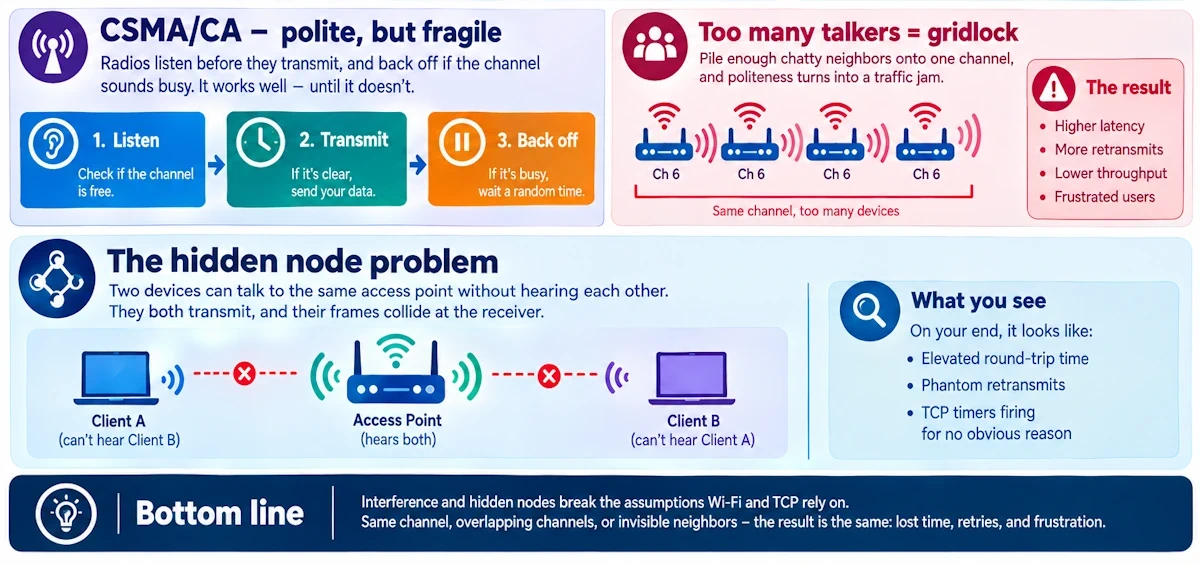
A neighbor you've never met, running an access point you've never seen, can wreck your TCP sockets from thirty feet away. No malware, no bad code, just radio waves fighting for the same sliver of spectrum. Here's how to catch the culprit tonight, with your own gear and a bit of patience.
A Tale of Two Access Points
I once got called into an office where sockets kept dying mid-conversation. Developers blamed the app for three straight weeks. They rewrote retry logic, added exponential backoff, questioned their own sanity. Turned out the real offender was a forgotten access point in the supply closet next door, broadcasting on the exact same channel as the office network. Nobody had touched it in two years. It just sat there, quietly stealing airtime.
The Primer You May Need
Co-channel interference happens when two or more networks occupy the identical channel and have to take turns talking. Adjacent-channel interference is a different beast: overlapping edges of nearby channels bleeding into each other. CCI is governed by CSMA/CA, the polite-but-fragile system where radios listen before they transmit, and back off if the channel sounds busy. Pile enough chatty neighbors onto one channel and that politeness turns into gridlock.
Then there's the hidden node problem, a wrinkle that makes this worse than ordinary crowding. Two devices might both talk to the same access point without being able to hear each other at all, due to distance, walls or antenna orientation. Neither backs off because neither detects the other's transmission, so their frames arrive at the same moment and collide at the receiver. The result on your end looks like elevated round-trip time, phantom retransmits, and TCP timers tripping for no obvious reason.
From Radio Chaos to a Dead Socket
Here's the chain, link by link:
- Every collision forces an 802.11 retry at the link layer. Stack enough retries and your per-packet latency balloons, dragging TCP's RTT estimate up with it until retransmission timeouts start firing.
- Interference rarely behaves smoothly. It's bursty - a neighbor's microwave kicks on, a laptop joins a call - and that burstiness confuses congestion control algorithms built around smoother loss patterns. Throughput doesn't degrade gracefully - it falls off a cliff!
- Wi-Fi queuing and kernel socket buffers create head-of-line blocking. One stalled frame holds up everything behind it, and that local stall becomes a visible application timeout.
- Short-lived connections suffer worst. A SYN sent during a contention storm might never get answered in time, and keepalive probes silently fail, closing sockets the application never intended to close.
Run “ethtool -S wlan0” during one of these episodes and you'll often see tx_retries or tx_failed climbing in lockstep with your socket errors. “dmesg” might show txqueuelen overflow warnings. None of that originates in your code. As I like to tell developers who reach for the debugger first: it's rarely just an app bug when sockets fail only on Wi-Fi.
Finding the Invisible Neighbor
Before touching a line of code, go looking for the radio problem with your eyes open, not your hands on the keyboard.
Passive detection costs you nothing and breaks nothing. Watch beacon density on your channel - every overlapping BSSID is a competitor for the same airtime. Track retry rates and signal-to-noise fluctuations on your client radios over a day, not a minute. Pull packet captures and calculate the airtime-busy fraction, a number that tells you how saturated your channel really is. Dig through AP logs for excessive association and disassociation churn, often a tell that clients are hopping around trying to escape a noisy channel.
Active detection takes more effort but gives sharper answers. Run a full channel survey across 2.4, 5 and 6 GHz, ideally with a proper spectrum analyzer that reveals non-802.11 energy lurking where Wi-Fi scanners can't see: cordless phones, baby monitors, industrial equipment. Push iperf traffic across different channels and times of day to correlate measured throughput against real conditions rather than guesswork. Probe for rogue SSIDs and hidden BSSIDs squatting on your channel with mismatched capabilities. Run a controlled experiment: shift your AP's channel for a short window and watch if sockets stabilize. And don't underestimate a free phone app for Wi-Fi analysis; it won't replace a spectrum analyzer, but it'll point you in a direction fast.
Start with the passive stuff. Save the invasive reconfiguration for when you've got a hypothesis worth testing.
The Cheat Sheet
On the Wi-Fi side: “iw dev wlan0 scan” and “iwlist” reveal neighboring networks, signal strength, noise floor and beacon interval, fields worth logging over time rather than glancing at once. “iw dev wlan0 link” surfaces current retry and failure counters straight from nl80211. Wireshark on a monitor-mode capture shows 802.11 retransmission flags, RTS/CTS exchanges, and sequence number gaps that scream collision. For raw spectrum visibility, tools like MetaGeek's Chanalyzer or a cheap RTL-SDR running rtl_power will expose non-Wi-Fi energy signatures that no ordinary scanner catches.
On the socket side: “ss” gives you retransmit counts and connection state at a glance, faster than the older netstat. “ip -s link” and “ethtool -S wlan0” expose kernel-level drops and transmit errors. Correlate a tcpdump capture on the socket's port against a simultaneous Wi-Fi capture, and you'll often see the two retransmission timelines line up almost perfectly.
My own go-to during an incident: switch the AP to a clean channel for five minutes and watch what happens to the sockets. If they recover, you've found your answer. No further debate needed.
A Lab You Can Run Tonight
Grab two access points, or one AP plus a repeater, and a laptop with monitoring tools installed. Set both radios to the same channel. Run a TCP iperf session between client and server and just watch; throughput will dip and retransmits will climb as contention builds. Now move one AP to a different channel and watch the recovery happen in real time. It's one of those demonstrations that makes the abstract concept click immediately: bursty loss, a visible rate collapse, then a clean bounce-back the moment the collision domain splits.
Fixing It Without Drama
Quick wins first: shift to a less crowded channel, preferably on 5 GHz or 6 GHz where there's simply more room to breathe. Trim transmit power and narrow your channel width to shrink your contention footprint. Push clients toward different bands using band steering so they're not all fighting over the same lane.
Operational fixes go deeper: enable airtime fairness and QoS to protect latency-sensitive traffic, invest in proper channel planning, and consider automated RF management in dense deployments where manual tuning can't keep up. Keep firmware current, plenty of driver updates exist specifically because of poor retry handling under contention.
For the long haul, mesh systems with wired backhaul avoid stacking multiple APs into one collision domain altogether. And in genuinely stubborn environments, bring in an RF consultant rather than guessing indefinitely.
Hidden Wi-Fi neighbors can absolutely break your sockets, and the fix almost never starts with code. Scan. Measure. Isolate. Fix. In that order, every time.