When Encryption Masks the Problem: Troubleshooting TLS Over Wireless Links
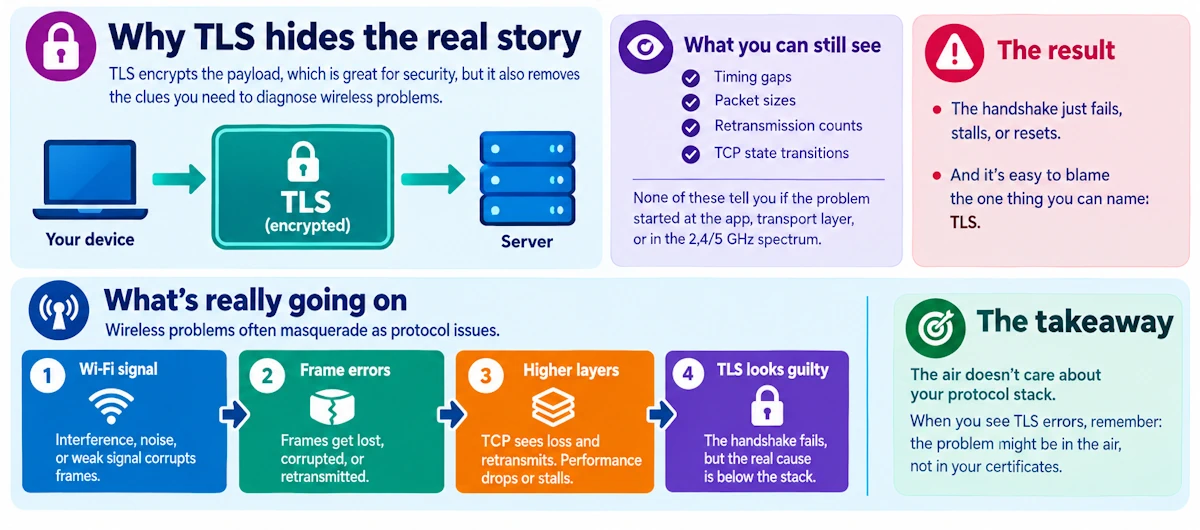
Here's a scenario I've seen happen more times than I can count. A handshake fails. Somebody glances at the logs, sees "TLS" in the error, and spends the next three hours fiddling with cipher suites and certificate chains. Meanwhile the actual culprit is sitting eighteen inches away, radiating on channel 6, fighting for airtime with a neighbor's baby monitor.
I taught RF for years before I retired, and if there's one lesson that never stopped being true, it's this: the air doesn't care about your protocol stack. And wireless problems masquerade as everything else because the layers above them inherit the mess without ever seeing its source.
Why TLS hides the real story
Encryption does its job a little too well sometimes. It wraps payloads so no one can peek inside, which is the entire point, but it also strips away the signals you'd normally use to diagnose trouble. So, you're left staring at timing gaps, packet sizes, retransmission counts and TCP state transitions. None of that tells you if the problem originated at the application, the transport layer, or somewhere out in the 2.4 or 5 gigahertz spectrum where frames get mangled by fading and contention. The handshake just fails, or stalls, or resets, and the temptation is always to blame the thing you can name: TLS.
Signs that point to the air, not the cipher
A few patterns should make the hair on your neck stand up and point you toward the radio instead of the handshake logic.
- TLS handshakes that succeed sometimes and stall other times, even with identical client and server configuration, session after session.
- Long tail latencies paired with bursts of retransmits that line up suspiciously well with other devices waking up and chattering on the same channel.
- Sessions that establish just fine but then the application stalls, downloads crawl, or timeouts pile up after the fact.
- A client behaving completely differently on Ethernet versus Wi-Fi, same device, same server, same everything else.
- "Server resets" that oddly correlate with RSSI dips or an access point getting hammered by load.
If you're seeing two or more of these at once, stop blaming the certificate chain. Go look at the spectrum.
Five quick tests to split TLS from wireless
You don't need a lab full of gear to get a clear answer. A handful of binary checks will usually tell you which direction to run.
First, the wired versus wireless A/B test. Plug the same client into a cable, repeat the exact operation, and watch if the failure vanishes. This single test has saved me more debugging hours than anything else in the toolbox.
Second, exercise TLS on its own with openssl s_client or a bare curl request, no application logic involved. Time it. Run it a dozen times. If it fails intermittently with nothing else running, you've isolated something closer to the transport.
Third, baseline with ping and traceroute. Compare ICMP loss and latency against what you see on actual TCP flows, since some APs and firewalls treat ICMP very differently from TCP traffic.
Fourth, push some real throughput through with iperf3. Raw link stability under load tells you things a single handshake never will.
Fifth, grab a short tcpdump capture on the client and look for retransmissions, duplicate ACKs, and window size changes that don't make sense for the amount of data moving.
Reading the packet capture like a detective
This is where the real story usually hides, if you know where to squint.
Retransmissions and out-of-order packets concentrated on the client side are a strong tell. Growing RTO timers and fast retransmit events with zero congestion signal from the server tell you the server isn't the bottleneck. Watch for small bursts of packets followed by oddly long silences - that's classic air contention or a radio backing off its data rate after a string of failures. TLS record sizes that consistently correlate with retransmission spikes often point to PMTU or MSS trouble, where fragmentation over the wireless hop is quietly breaking things. And if you can capture radiotap or 802.11 metadata, look at retry counts, signal strength, negotiated data rate and frame aggregation behavior. That metadata is the unvarnished truth the TCP layer above it can only guess at.
Wireless events that look like TLS failures
A good number of root causes live entirely in the RF domain but present symptoms that look exactly like a broken handshake or a flaky certificate.
Fast fading and marginal signal strength cause intermittent frame loss that destroys the timing assumptions TLS quietly depends on. Rate adaptation algorithms, combined with frame aggregation, create throughput that swings wildly and drops packets in bursts. Clients roaming between access points, or getting bounced by band-steering, mid-handshake is a particular favorite of mine; it looks exactly like a server timeout.
Power-save modes and Bluetooth coexistence introduce tiny, almost invisible microbursts of loss. Fragmentation, misconfigured QoS, or a mismatched MTU can force TLS records to fragment awkwardly and stall. And don't forget captive portals, client isolation rules, or overzealous AP firewall policies that interfere with traffic right after the handshake completes, when everyone assumes the hard part is over.
A workflow for the deep dive
Start by reproducing the issue reliably. Note the location, the device, the network load, everything. Document the exact steps, because intermittent wireless bugs have a cruel sense of humor about disappearing the moment you want to show someone.
Capture simultaneously on the client and at the AP or gateway, including 802.11 frame data if your hardware allows it. Then correlate timelines, line up TLS handshake events against retry counts, rate shifts, and RSSI dips minute by minute. Test mitigations one at a time, never in a pile: change the channel, disable aggregation, lock in a fixed rate, bump the MTU, turn off power-save. Then validate by repeating your original A/B test and comparing the new captures against the old ones side by side.
The toolkit worth keeping close
tcpdump and tshark with radiotap filters cut through the noise fast. Wireshark's "Follow TCP Stream" combined with its retransmission highlighting and 802.11 columns will save your eyesight. iw, iwconfig, iwlist and hostapd_cli give you the client and AP's own account of rate, HT and VHT settings. iperf3, ping, and ss round out your socket-state and throughput checks. And for genuine RF sleuthing, a spectrum scanner or something like aircrack-ng will show you the interference nobody's logs will ever mention.
When the trouble really is TLS
If the wired test reproduces the same failure, the captures show clean wireless frames with no retries or rate drops, and the server logs point squarely at certificate mismatches, protocol version conflicts, or ALPN negotiation failures, then fair enough. Escalate it as a TLS or application problem and stop chasing ghosts in the spectrum.
Telling the story to your team
Deliver findings as a timeline, not a theory. Something like: "At T plus forty seconds the client's RSSI dropped below negative seventy-five, retries spiked, and the TLS handshake timed out three seconds later." That's a sentence a network team or an RF engineer can act on immediately. Offer concrete remediation: relocate the AP, switch channels, adjust aggregation or DTIM settings, or tune the application's TLS timeout values to tolerate the real-world air. If it's still unresolved, hand over annotated PCAPs, radiotap snapshots, device models and firmware versions. Vague tickets get vague answers.
A pocket checklist worth memorizing
Reproduce it, capture it, compare wired against wireless. Check RSSI, retry counts and data rates buried in the capture metadata. Try a fixed rate or strip out advanced 802.11 features temporarily. Test with a smaller TLS record size and an adjusted MSS or MTU. Write a one-page summary with timestamps and evidence before you hand it off.
Don't let encryption hand you a false alibi. Test the air first, correlate the facts, and fix the problem that's actually there.