From Bytes to Air: Tracing a TCP Socket All the Way to the Wi-Fi Frame
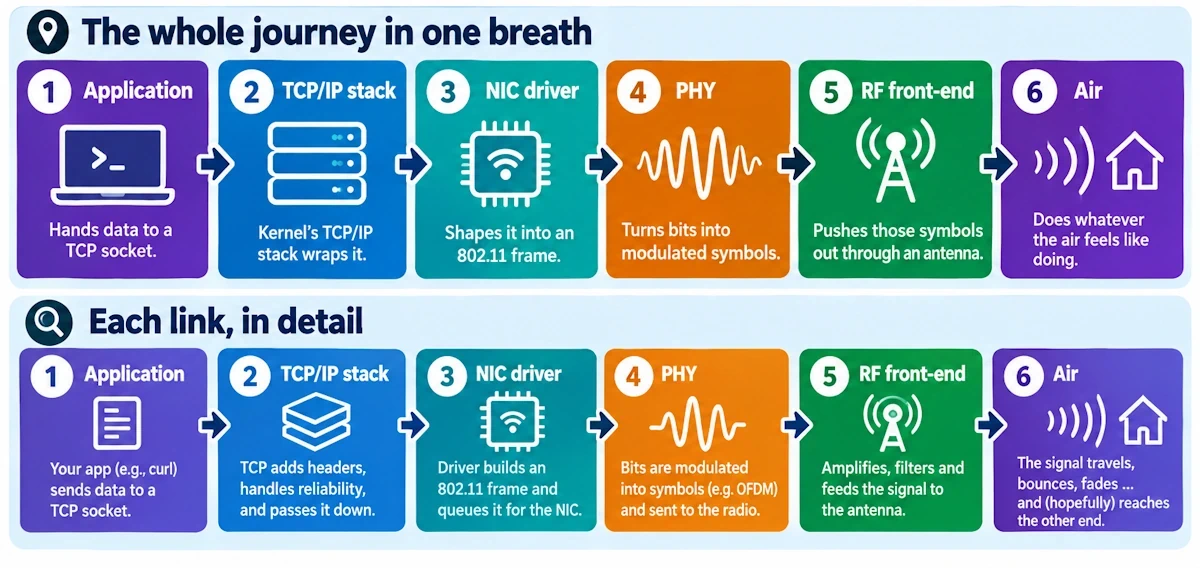
You type curl example.com, hit enter, and forget about it. Two seconds later a page loads. In between, your one request turned into electrons shoved down a copper trace, then symbols riding a radio wave, then a fading blob of RF bouncing off your kitchen wall. Let's follow one byte, start to finish, no hand-waving.
Here's the whole map in one breath: application hands data to a TCP socket, the kernel's TCP/IP stack wraps it, the NIC driver shapes it into an 802.11 frame, the PHY turns bits into modulated symbols, the RF front-end pushes those symbols out through an antenna, and the air does whatever the air feels like doing. Every section below zooms into one link of that chain.
What actually leaves your process
When your code calls send() or write(), you're not transmitting anything. You're handing a chunk of memory to the kernel and trusting it'll deal with the mess. That handoff alone involves a copy from your user buffer into a kernel socket buffer, and the TCP state machine takes over from there: SYN, SYN-ACK, ACK, a congestion window that starts small and grows, an MSS that caps how big each chunk can be before fragmentation becomes a problem downstream.
Ready for the fun part? Nagle's algorithm might hold your small write hostage, waiting to bundle it with more data rather than fire off a tiny packet. Delayed ACKs on the receiving end do something similar in reverse. And the PSH flag tells the receiver "stop waiting, hand this to the application now." Window scaling lets two modern hosts negotiate a much bigger pipe than the old 64KB ceiling. None of this is cosmetic. It shapes exactly when bytes leave and how big each chunk is.
And one twist that trips up a lot of folks debugging with tcpdump: what you capture at the socket layer often isn't what goes out the wire. Checksum offload and segmentation offload mean the kernel can hand the NIC a giant logical segment and let the hardware chop it into real Ethernet-sized frames with real checksums. Your capture tool, depending on where it taps in, might show you a "lie." Learn this once and you’ll save yourself the grief forever.
The plumbing between socket and silicon
TCP segments get wrapped in IP, and now you're dealing with TTL, the DF bit, and wonder if path MTU discovery actually works on your network (spoiler: sometimes it doesn't, and fragmentation silently wrecks performance).
Below that sits the queuing layer, the qdisc, the transmit ring. This is where bufferbloat lives, quietly adding latency nobody asked for because someone decided bigger buffers must be better. They're not - at least not always!
And netfilter sits in there too, rewriting addresses for NAT, dropping packets your firewall rules didn't like, sometimes mangling headers before the packet ever reaches a driver. A clean conceptual model falls apart fast once you remember how much happens before silicon gets involved.
Where software hands off to hardware
The NIC driver is the great translator. It takes that IP packet and starts building the structures 802.11 actually understands: MSDUs, MPDUs, encryption handled either here or by firmware, DMA descriptors pointing at memory the hardware will read directly.
DMA matters because it determines when your bytes genuinely leave system RAM rather than just sitting queued. Zero-copy paths exist precisely to dodge the overhead of shuffling data around needlessly.
Interrupts and batching decide the rhythm of all this. NAPI and interrupt moderation exist so your CPU isn't fielding ten thousand tiny interrupts a second, but that batching introduces its own latency wrinkles, especially under microbursts.
And increasingly, the Wi-Fi chip's firmware runs its own show. Rate control, frame aggregation (A-MPDU bundling several frames into one transmission), retransmission logic. A huge amount of "Wi-Fi intelligence" lives in firmware blobs the driver barely touches.
The frame itself, and the dance around it
An 802.11 MAC header is a stranger beast than Ethernet's. You've got transmitter address, receiver address, source, destination, sequence control, QoS fields, and a pile of HT/VHT/HE extensions depending on your standard. Four addresses instead of two, because wireless needs to track the access point as a separate hop.
Encryption (WPA2's CCMP, or WPA3's GCMP) wraps the payload, but headers stay visible so the radio and the access point can route things properly. Aggregation means several of your TCP segments might ride together inside a single PHY transmission, which is a brilliant efficiency trick once you understand it's happening.
And underneath all this sits a choreography most people never notice: ACKs confirming every unicast frame, RTS/CTS negotiating airtime to dodge hidden-node collisions, beacons broadcasting the network's existence every hundred milliseconds whether anyone's listening or not. Ethernet never had to deal with a shared, contested medium like this. Wi-Fi negotiates for every single transmission.
Bits becoming symbols becoming signal
The PHY preamble exists purely so the receiver's radio can lock onto timing and estimate the channel before actual data shows up. Skip that step and nothing downstream works.
OFDM splits your data across dozens of subcarriers, each modulated using schemes ranging from simple BPSK up through dense 256-QAM constellations, depending on how clean your signal path is. Forward error correction rides alongside, recovering from the inevitable bursts of corruption that real radio channels dish out.
If you ever capture radiotap metadata, look at RSSI, the MCS index, retry counts. Those numbers tell the real story of your link's health far better than a signal bar icon ever could.
The last stretch: RF, antenna, open air
Inside the radio, a DAC converts digital symbols to analog, filters clean up the mess, an upconverter shifts everything to the right frequency, and a power amplifier pushes it toward the antenna. Every stage introduces some loss, some distortion, however small.
Antenna gain, polarization, and pattern matter more than raw transmit power in most real deployments. A cheap directional antenna outperforms an expensive router when someone finally points the energy where it needs to go.
And then physics takes the wheel. Path loss, multipath, fading, interference from your neighbor's network or your microwave oven. These aren't edge cases, they're Friday. Rate drops, retries climb, and eventually your TCP stack sees timeouts and backs off the congestion window, which is the network admitting the air won.
Checklist for when it all goes sideways
Grab tcpdump or Wireshark for the TCP and IP layers, then flip your Wi-Fi adapter into monitor mode and inspect the actual 802.11 frames with radiotap headers attached. On Linux, ss, ethtool, iw, and tc qdisc show, show, dmesg often reveal driver quirks before anything else does. For the RF layer itself, a cheap RTL-SDR dongle or a proper spectrum analyzer will show you interference your packet tools never will. Then run iperf while forcing different MCS rates and watch how RTT, RSSI, and retransmits move together.
A few hard truths
Software decides what gets sent. Hardware decides when it actually leaves. And the air decides if the signal survives the trip. Tonight's homework from me: fire up Wireshark in monitor mode during a normal download and just watch the retries climb as you walk away from your router. You'll feel the whole stack in a way no diagram manages.