Bufferbloat Exposed: How Wi-Fi Queues Kill TCP Latency and How to Fix It
Your bandwidth test says 400 Mbps. Your video call freezes like a deer in headlights anyway. Something's lying to you, and it's not your ISP - it's the queue sitting quietly between your laptop and the rest of the internet.
The bathtub nobody told you about
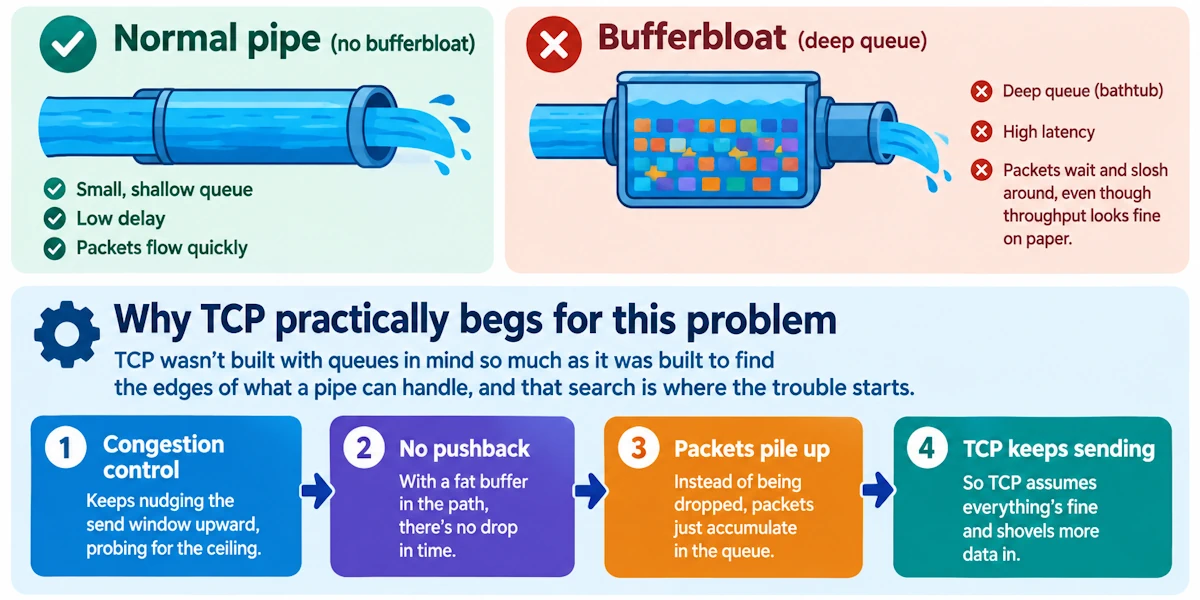
Bufferbloat is a plain enough idea once you see it: too much queuing stacked inside routers, drivers, and chipsets, turning what should be fast delivery into a waiting game. Think of your connection as a pipe. A reasonable pipe moves water fast and empties quick. Bufferbloat is what happens when someone bolts a deep bathtub onto that pipe. Water still flows out eventually, sure, throughput looks fine on paper, but anything that needs to get through right now sits and sloshes around first. Your Zoom packet is stuck behind somebody's Steam download, and nobody's told it there's a line.
Why TCP practically begs for this problem
TCP wasn't built with queues in mind so much as it was built to find the edges of what a pipe can handle, and that search is where the trouble starts.
Congestion control keeps nudging the send window upward, probing for the ceiling, and it won't stop until something pushes back. When there's a fat buffer sitting in the path, that pushback never arrives in time. Packets just pile up instead of getting dropped, so TCP assumes everything's fine and keeps shoveling more data in.
Here's the cruel part: a deep buffer hides loss. Delayed acknowledgments mean delayed signals, and delayed signals mean TCP reacts to congestion only after it's already a serious problem, then overcorrects like a driver who slams the brakes after missing the stop sign entirely.
And this is where throughput and latency go to war. Big bulk transfers are perfectly happy sitting in a queue. Your DNS lookup, your game's input packet, your voice call's tiny audio frame? Not so happy. They get stuck in line behind someone else's file upload, and suddenly your "fast" connection feels like dial-up during a thunderstorm.
Worse still, queued packets delay the loss signals TCP depends on, so when congestion does finally get acknowledged, you get bursts of retransmits rather than smooth correction. Jitter spikes. Connections stutter. Welcome to bufferbloat's calling card.
Wi-Fi: queueing's favorite playground
Wired networks have this problem. Wi-Fi has it worse, and there are good reasons for that.
Start with the shared medium itself. Every device on your network is fighting for airtime, and the MAC layer's retry-and-backoff dance means congestion from one client ripples outward and compounds queuing delays for everybody else nearby.
Then there's the plumbing inside the access point. Multiple transmit queues, software queues feeding hardware queues, per-priority buffering meant to be clever about voice versus bulk traffic… it all sounds elegant until you realize it's also brilliant at hiding congestion from the very mechanisms meant to detect it.
Frame aggregation doesn't help either. A-MPDU bundling is a genuinely smart trick for cramming more data into less airtime, but it also means one client can monopolize the channel for a stretch, serializing everybody's queue behind it and dragging latency along for the ride.
Home networks add their own twist: most setups are upload-constrained, not download-constrained, and the upstream bottleneck is usually sitting right where your router's buffers are deepest. That's a recipe for latency nobody asked for.
And then, the quiet culprit: factory defaults. Vendor firmware ships with generous transmit queues and long ring buffers because that configuration wins throughput benchmarks. Nobody benchmarks latency on the box, so nobody tunes for it.
The tells that give it away
You'll recognize bufferbloat the moment someone describes it to you, because you've lived it. Pages crawl even though the speed test insists you've got plenty of headroom. Ping times balloon and jitter goes wild the instant an upload or a big local transfer kicks off, and your VoIP call turns to mush. Packet captures show bursts of retransmissions and RTTs that look like a seismograph during an earthquake. And there's the classic household complaint: "why does everything lag the second someone starts streaming?" That's one saturating flow filling a buffer and dragging everyone else's latency up with it.
Catching the culprit red-handed
Run a continuous ping alongside a saturating iperf transfer and watch the RTT climb while the "speed" looks great - that gap is bufferbloat waving at you!
Flent's RRUL and TCP_RR tests are purpose-built for exactly this, showing how throughput and latency fight it out under load. Dig into tc qdisc stats, ss, and tcpdump to see where packets are queuing and where retransmits are piling up. For a five-minute sanity check, bufferbloat.net or DSLReports' speed test will slap a letter grade on your connection, and it's often humbling.
Go deeper if you're curious: check txqueuelen, driver ring buffer sizes, and firmware defaults on your router. Sniff the air itself with Wireshark and radiotap to correlate long aggregated frames with the latency spikes you're chasing. The pattern usually jumps out fast.
Fixing it, properly this time
Architectural rule first: shape traffic at the actual bottleneck, which for most home networks is the uplink to your ISP. Shaping anywhere else is just rearranging deck chairs.
The algorithms that actually work: fq_codel and CoDel attack standing queues directly, keeping delay in check without you fiddling with knobs constantly. CAKE goes further, layering in fairness between flows and compensating for Wi-Fi's quirky overhead, which makes it the pragmatic pick for home gear. PIE shows up on some hardware platforms too, so check what your device actually supports before assuming.
On the router itself: flash firmware that supports CAKE or fq_codel, OpenWrt being the obvious route, and turn on smart queuing for both WAN and wireless egress. Trim hardware ring buffers and txqueuelen where you can reach them. Shape your upstream to something like 95% of your real line rate rather than trusting the ISP's queue to behave. And if small-packet latency matters more to you than raw throughput, dial back aggressive aggregation settings on the AP.
Wireless tuning matters too: shrink aggregation limits, adjust AMPDU parameters, and turn on airtime fairness so one device can't hog the channel and drag everyone else's queue along with it. Keep driver firmware current, modern mac80211 drivers have genuinely improved here. Where your hardware supports it, per-station queuing keeps one chatty device from flooding the shared buffer.
On the software side: pace your sockets rather than dumping data as fast as the OS allows, and pick congestion control that plays nicely with AQM rather than fighting it. BBR can help here, used thoughtfully. And if the firmware simply won't cooperate no matter what you try, it's time to replace the box. Some routers are just a lost cause.
A weekend project for the curious
Confirm the problem first: ping plus a saturating upload, watch the RTT jump. Flash OpenWrt or dig into your vendor's QoS settings and switch on CAKE for the WAN interface, with overhead accounted for properly on wireless. Shape upstream to roughly 95% of your measured rate, trim the AP's txqueuelen, flip on airtime fairness. Then verify with flent and a continuous ping running in the background, tweaking aggregation and queue depth until the spikes flatten out.
A word for the people writing the code
If you're building anything latency-sensitive, assume the network will add tens or hundreds of milliseconds somewhere you didn't expect, and design your pacing and ACK handling with that reality baked in from day one. Instrument your sockets. Measure RTT from inside the application, not just at the network layer, and surface that data somewhere your ops team can actually see it. Bufferbloat hiding in production is a far nastier problem than bufferbloat you can see on a dashboard.
Go test your network right now
Run the test. See the spike. Install CAKE or fq_codel at the spot where your network genuinely chokes, not wherever's convenient. That bathtub may have been quietly draining your latency for years, but the fix takes a single afternoon.