How Antenna Choice Changes TCP Throughput: Patterns, Polarization, and Gain
Your download crawls. You stare at the progress bar, blame your ISP, restart the router, then blame the cloud. Here's the thing nobody tells you in the beginner forums: that stutter might have nothing to do with your provider and everything to do with a two-inch piece of metal sticking out of your access point - the directional WiFi antenna. Antennas shape the invisible field that every packet has to swim through before it ever touches a socket. Get the pattern wrong, get the polarization wrong, and TCP will punish you for it, every single time. I spent decades teaching this stuff and I still get a kick out of watching someone's jaw drop when a $15 antenna swap doubles their iperf numbers.
From Radio Wave to Running Socket
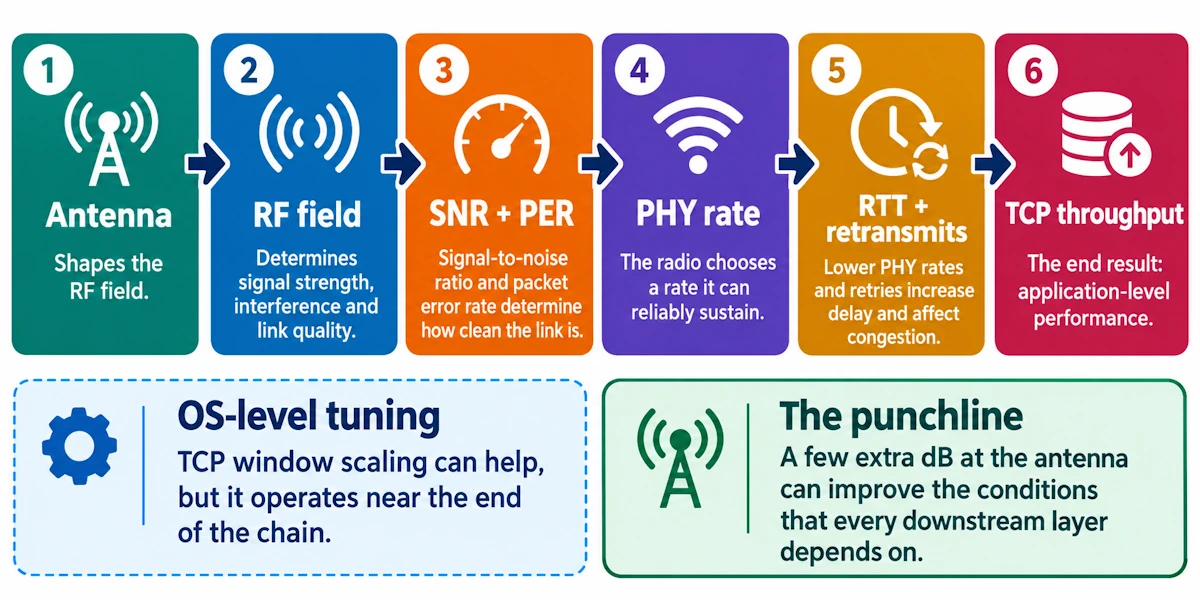
Here's the chain, laid bare: antenna shapes the RF field, the field determines your signal-to-noise ratio and packet error rate, that determines which PHY rate your radio dares to pick, and PHY rate plus retransmits dictate your round-trip time and congestion window. TCP throughput sits at the end of that chain like a kid at the end of a game of telephone. Fiddle with TCP window scaling all you like; a few extra dB at the antenna will usually outrun your best OS-level tuning.
The Antenna Primer Every Socket Jockey Needs
Radiation patterns come in two broad flavors: omnidirectional, which sprays energy in a donut shape around the antenna, and directional, which concentrates energy into a lobe pointed somewhere specific. Every pattern has nulls, dead spots where energy practically vanishes, and you will find them the hard way if you don't plan for them.
Gain, measured in dBi, tells you how much an antenna concentrates energy compared to a theoretical isotropic radiator. It's just geometry - squeezing the same power into a narrower slice of space.
Polarization refers to the orientation of the electric field, linear or circular, and mismatched polarization between transmitter and receiver is one of the sneakiest throughput killers in wireless networking. Beamwidth ties it all together: narrow beams buy you range and clarity in one direction, wide beams buy you coverage and forgiveness for a client that wanders.
Where Antenna Choice Actually Bites Into TCP
Higher SNR from a well-matched, well-aimed antenna lets rate adaptation algorithms climb to a higher MCS index. Higher MCS means less airtime per byte, which means more actual payload squeezed through the same second. That's free throughput, no firmware update required.
Flip it around: a lousy pattern or a polarization mismatch inflates your frame error rate. More errors mean more MAC-layer retries, and every retry adds latency. TCP, ever the cautious accountant, interprets that latency and loss as congestion and throttles the window. Your file transfer slows down and your browser blames the cloud.
Directional antennas can be a genuinely elegant solution to interference. Aim energy only where you need it and you stop polluting your neighbor's spectrum, and vice versa. A high-gain omni, by contrast, often just broadcasts your problem further, stirring up co-channel interference across the floor.
There's also a nastier failure mode: rate adaptation instability. An antenna null wandering in and out of range as a client moves creates oscillation, where the radio keeps hopping up and down between MCS rates, unable to settle. TCP sees that as a jittery, unreliable path and throughput craters in fits and starts rather than degrading gracefully.
And don't sleep on asymmetry. If your AP antenna is a beast and your laptop's built-in antenna is a whisper, your downlink might look gorgeous while your uplink starves, ACKs getting lost, uploads crawling, and nobody in the help desk queue will think to check the antenna gain mismatch.
Patterns in the Wild and What They Do to Your Flows
Omnidirectional sticks, your classic rubber duck antennas, serve mobile clients well because coverage stays consistent as people wander the room. The tradeoff: peak rates stay modest because you're never concentrating energy anywhere.
Sector panels and directional arrays shine when you want to pour throughput into a specific crowd, a lecture hall or outdoor plaza. Step off-axis, though, and clients can drop clean off the lobe edge with surprisingly little warning.
Highly directional antennas, Yagis and parabolic dishes, are the workhorses of point-to-point backhaul. Rock-solid SNR, predictable TCP numbers you could set your watch by. Hand that same dish to a roaming laptop user and watch the experience collapse, because you've also thrown away the multipath richness that MIMO depends on.
Nulls deserve their own warning label. A pattern that looks gorgeous on a manufacturer's polar plot can develop an ugly dead spot the moment it meets your actual walls, furniture, and that microwave in the break room. Test in your space. Datasheets lie by omission, not malice.
Ceiling-mounted directional units add a vertical wrinkle too. Angle the elevation wrong and you'll illuminate the hallway beautifully while leaving the office below in the dark, RF-wise.
Polarization: The Silent Assassin
Cross-polarization mismatch, vertical transmitting into a horizontal receiver, can cost you 10 to 20 dB. That's the difference between a snappy connection and one that barely limps along. Circular polarization earns its keep when device orientation is unpredictable, think handheld clients tilting every which way. Linear polarization rewards you with better raw gain when you know exactly how things are mounted.
MIMO complicates things further. Polarization diversity across antenna elements is part of how spatial streams get harvested, and a tilted or misaligned client can quietly collapse that diversity, showing up as an unexplained throughput dip that looks for all the world like a software bug. Before you blame the driver, check the hardware: connector type, mount angle, documented polarization on every AP you deploy. Future you will be grateful.
Gain and the Link Budget Arithmetic
Every +3 dB roughly doubles radiated power, and that extra margin can be the difference between your radio settling for a timid MCS and reaching for something ambitious. But gain is a zero-sum game spatially: concentrate energy in one direction and you've necessarily starved another. A high-gain AP antenna pointed confidently across a warehouse does nothing for a client whose own antenna and transmit power are feeble.
Regulatory bodies cap your EIRP for good reason, so there's a ceiling on how much gain you can legally stack before you're breaking rules rather than breaking records. As a rough compass: +6 dBi often nudges static clients up a rate step or two without much downside. +12 dBi starts looking excellent for a fixed backhaul link but becomes a liability the moment you expect anyone to roam through that beam.
MIMO, Beamforming, and the Multipath You Didn't Know You Needed
Multiple antennas create spatial streams, but only if there's enough pattern and polarization diversity for the radios to tell those streams apart. Swap a scattering of omnidirectional elements for a single high-gain directional antenna and you may have quietly strangled your own MIMO gains by flattening the multipath environment the algorithm depends on. Beamforming arrays can help enormously, focusing energy toward a known client position, but point that focused beam at empty air because the client moved and you've built yourself a very expensive dead zone. For anything but a fixed link, don't trade away diversity just to chase a bigger gain number on a spec sheet.
Diagnosing the Problem Instead of Guessing
Collect real data: RSSI, SNR, packet error rate, PHY rate, retry counts, and actual throughput via iperf3, not just a signal bar icon. Ping and RTT measurements plus a Wireshark capture will tell you stories that signal strength alone never will. High RSSI paired with disappointing TCP throughput usually points to interference or retransmissions, not range. Asymmetric ACK behavior often fingers a polarization mismatch or an uplink power problem hiding behind an otherwise healthy-looking downlink.
Run the simplest test available to you: swap in a known-good directional antenna on the client side and push a long TCP flow to establish a baseline. Keep a log, orientation, polarization, antenna model, mounting height, every time. Repeatable measurement beats gut feeling, every single time I've checked.
Two Short Stories From the Field
A coffee shop swapped its 2 dBi stock antenna for a 9 dBi omni, hoping for blanket coverage. Seated customers near the counter got a lovely bump in throughput. Customers by the window got nothing, a brand new dead zone carved out by the narrower vertical beam that came bundled with the extra gain. The fix was a second, low-gain ceiling unit, not more power on the first.
A home user building a backyard point-to-point link swapped a simple dipole for a parabolic dish and landed a rock-steady 200+ Mbps TCP connection between buildings. Great news for the backhaul, terrible news for the handful of mobile devices that used to hang off that same radio - their throughput collapsed until a dedicated local AP took over serving them.
A Working Checklist Before You Touch Any Hardware
Match polarization across every AP and client pairing, and write it down somewhere you'll actually find it later. Reserve directional antennas for fixed links or targeted interference control, and keep omnidirectional coverage for anything mobile. Pick moderate gain indoors so you don't sacrifice the multipath diversity your MIMO setup needs to function. Test with genuine TCP flows, not signal bars, and measure both directions of the link separately. Hunt down asymmetry between AP and client capability before you declare victory. And if you spot rate adaptation oscillating like a nervous tic, look first at antenna diversity and repositioning before you start digging through driver settings.
Myths Worth Burying
More gain always means more TCP throughput: false, unless coverage, polarization, and client transmit power all cooperate. RSSI alone predicts your throughput: false, you need SNR, retry counts, and an actual TCP test to know anything real. Antennas stopped mattering once MIMO arrived: false, antennas are precisely what determine if MIMO can harvest spatial streams at all, or just sit there wasting silicon.
Measure Before You Guess
Antenna choice remains one of the cheapest, highest-leverage levers you have over real TCP performance, cheaper than new hardware, faster than a firmware hunt. Run an iperf test before you touch anything, change one variable, run it again, write down what happened. Don't guess your way through RF. Measure it.